 ccshift
Your Claude Code sessions, back where you left them.
ccshift saves every open session in tab order and restores them all with one command. Readable names, search across old sessions, context warnings and handoff included. Works with Codex CLI and Gemini CLI too.
curl -fsSL https://www.timileyin.dev/ccshift/install.sh | shirm https://www.timileyin.dev/ccshift/install.ps1 | iexsudo install -d -m 0755 /etc/apt/keyringscurl -fsSL https://timileyinpelumi.github.io/ccshift/apt/ccshift.gpg | sudo tee /etc/apt/keyrings/ccshift.gpg >/dev/nullecho "deb [signed-by=/etc/apt/keyrings/ccshift.gpg] https://timileyinpelumi.github.io/ccshift/apt stable main" | sudo tee /etc/apt/sources.list.d/ccshift.listsudo apt update && sudo apt install ccshiftsudo dnf install https://github.com/timileyinpelumi/ccshift/releases/latest/download/ccshift_amd64.rpmgo install github.com/timileyinpelumi/ccshift/cmd/ccshift@latestThe installer offers to turn on autosave. ccshift keeps itself up to date, and ccshift uninstall removes everything.
Linux macOSBeta WindowsBeta
$ ccshift ls
#  CODE  NAME                   STATUS   CTX
1  KTR   api · PAY-2193         idle     41%
2  MDB   web · checkout-v2      busy     72%!
3  HZP   docs · Install guide   waiting  18%

# after a restart
$ ccshift restore
work: opening 3 sessions in kitty
  ✓ api · PAY-2193
  ✓ web · checkout-v2
  ✓ docs · Install guide
See it run
List, save, close every tab, restore, search old sessions, jump to one from the picker.
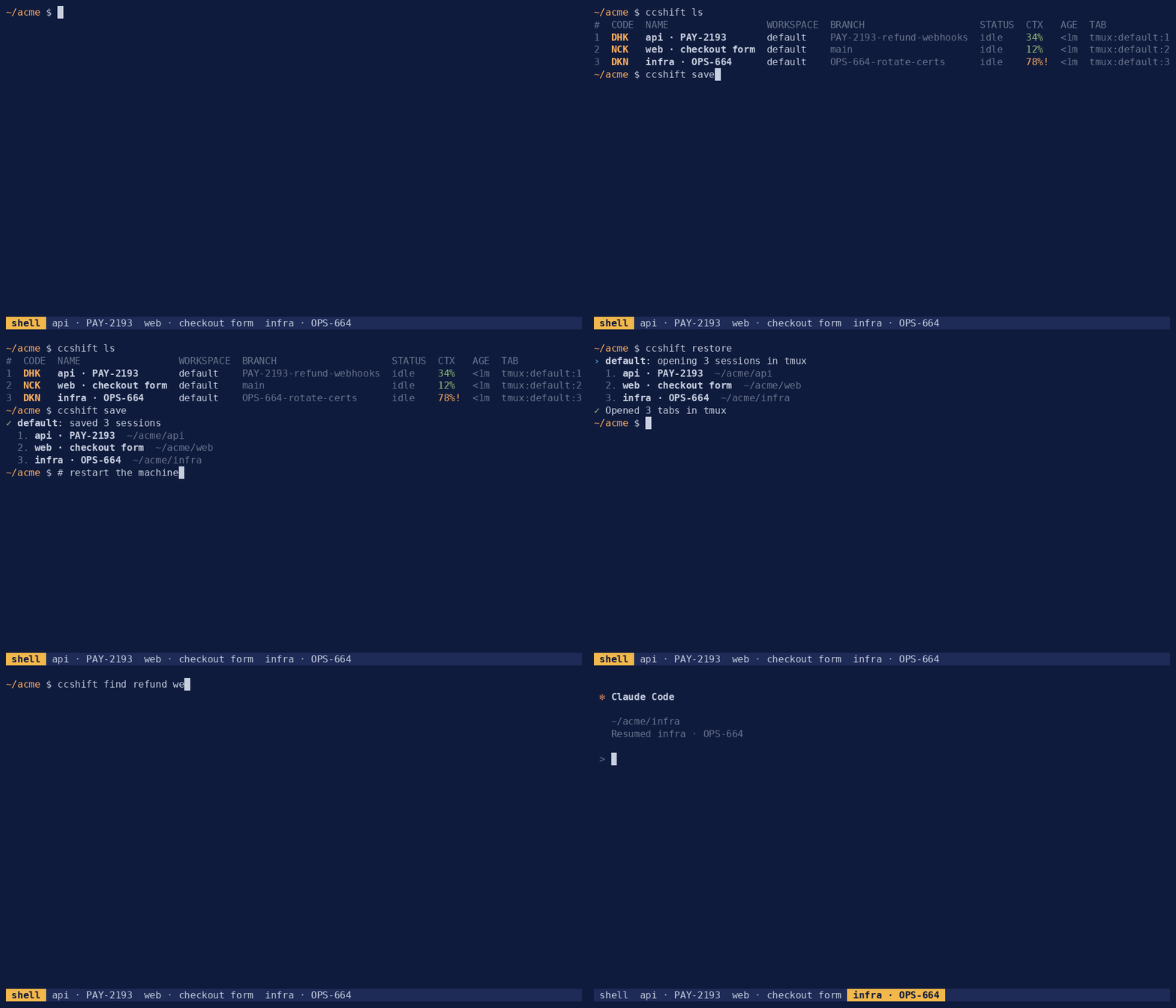
Everything a long session needs
One small binary. No daemon, nothing running in the background.
Restart without losing your place
One command reopens every session in its own tab, in the order you had them, each resumed where it stopped.
$ ccshift restore
work: opening 3 sessions in kitty
  1. api · PAY-2193         ~/dev/api
  2. web · checkout-v2      ~/dev/web
  3. docs · Install guide   ~/dev/docs
Saved as you work
Your layout is saved after every turn, so a crash or a dead battery costs you nothing. Sessions you exit leave the save. Sessions that were killed come back.
$ ccshift init
Added autosave hooks and the statusline to ~/.claude/settings.json.

$ ccshift doctor
ok  Claude Code is installed
ok  SessionStart hook is installed
ok  statusline is wired through ccshift
Names you can read
Every session is named after its repository and the ticket or branch you are on, and the tab title follows. Rename any session and your name wins.
before      after
api-d7      api · PAY-2193
api-41      api · PAY-2193 #2
web-0a      web · checkout-v2

$ ccshift rename 2 refund emails
Renamed api · PAY-2193 #2 to refund emails.
Know before context runs out
A desktop notification at 70% and again at 85% of the context window, and a live figure for every session in the list. Every session has a short code, so handing one off is ccshift handoff MDB. On Linux the notification has a Hand off button.
$ ccshift ls
#  CODE  NAME                   STATUS   CTX
1  KTR   api · PAY-2193         idle     41%
2  MDB   web · checkout-v2      busy     72%!
3  HZP   docs · Install guide   waiting  18%

● web · checkout-v2 is at 72% of its context window.
  Hand it off with: ccshift handoff MDB       [ Hand off ]
Continue in a fresh session
ccshift writes a brief of the goal, the decisions made, what is done and what comes next, then opens a new session that starts from it. Set auto_handoff = true and it happens by itself when a session reaches 85%.
$ ccshift handoff mdb
Writing the brief for web · checkout-v2 with sonnet.
✓ Handed web · checkout-v2 off to web · checkout-v2 (2).

# in the new tab
❯ Read the brief and continue from it.
Every session in one list
Run ccshift on its own. Type a few letters, press Enter, and you are in that session's tab, or it is resumed if it was only saved.
ccshift  type to filter  ↑↓ move  Enter open  Ctrl+X hand off

› pay

api · PAY-2193       running · kitty:1.1 · 41%
api · PAY-2107       saved · work
Find the session where you fixed it
Search every past session by what was said in it, newest first, and resume the one you want.
$ ccshift find refund webhook
 1  10m  api · PAY-2193  ~/dev/api
      the refund webhook retries forever when the provider returns 409
 2  6d   api · PAY-2107  ~/dev/api
      add idempotency keys to the refund webhook handler

Resume which? (number, or Enter to stop) 2
Codex CLI and Gemini CLI too
If they are installed, ccshift init sets them up as well. Their sessions are listed, saved and restored alongside your Claude Code sessions.
$ ccshift ls
#  NAME             STATUS  CTX  TAB
1  api · PAY-2193   idle    41%  kitty:1.1
2  web              codex   -    kitty:1.2
3  infra            gemini  -    kitty:1.3
Works with your terminal
Where a terminal reports its tab order, ccshift reads it. Everywhere else it keeps the order you last restored.
| Terminal | Opens as | Tab order | Titles and focus |
|---|---|---|---|
| tmux, kitty, WezTerm, zellij, Konsole | Tabs | Read live | Yes |
| GNOME Terminal, Ptyxis, Tilix, Xfce Terminal | Tabs | Remembered | No |
| Alacritty, foot, Ghostty | Windows | Remembered | No |
| Terminal | Opens as | Tab order | Titles and focus |
|---|---|---|---|
| iTerm2, tmux, kitty, WezTerm, zellij | Tabs | Read live | Yes |
| Terminal | Windows | Read live | Yes |
| Ghostty, Alacritty | Windows | Remembered | No |
| Terminal | Opens as | Tab order | Titles and focus |
|---|---|---|---|
| WezTerm | Tabs | Read live | Yes |
| Windows Terminal | Tabs | Remembered | No |
| WSL | Same as Linux | ||
Commands
The full reference is in the README.
ccshiftPick a session from a listccshift findSearch past sessionsccshift lsList sessions in tab orderccshift renameName a session yourselfccshift saveSave the layout nowccshift focusJump to a session's tabccshift restoreReopen everything savedccshift handoffContinue in a fresh sessionccshift newStart a named sessionccshift doctorCheck the setupccshift initTurn on autosaveccshift updateInstall the latest versionccshift uninstallRemove ccshift completely